
Yaar Win Game Download
The Yaar Win app is an Android APK you install directly — it isn't on the Play Store, and the first result for "yaar win download" on Google is usually an unrelated app called YAR. This page gets the right file onto your phone safely: where to download, the exact install steps, and how to verify you've got the genuine app.
Before anything: you're downloading the right app?
Type "yaar win download" into Google and the top results are APK aggregators — Uptodown, Softonic, Aptoide — serving a board game called YAR that has nothing to do with this platform. It matches on spelling, not substance. The genuine YaarWin game APK is distributed only through the platform itself: log in (or register) at the official site and the lobby offers the download. No aggregator carries it, and any aggregator claiming to is repackaging something.
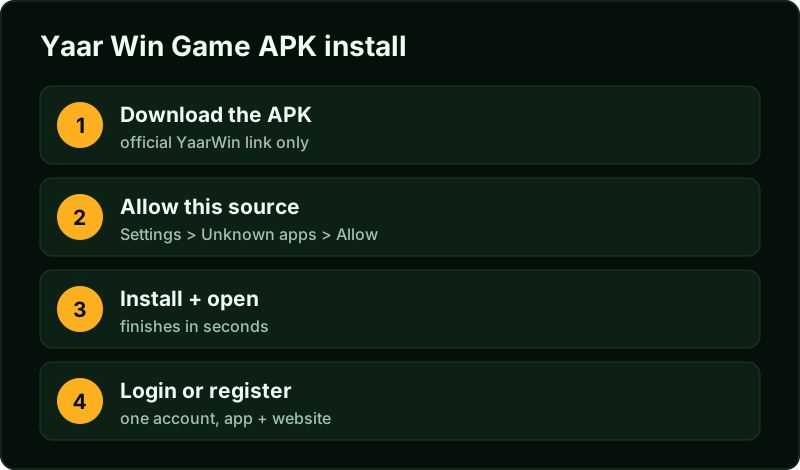
How to download the Yaar Win game APK
Open the official platform
Use the button above or go via our home page, which keeps the official-domain list. New users register on the way in — the form takes a minute and the invite code 58662168510 is pre-filled through our link.
Tap the download banner in the lobby
The APK link sits at the top of the lobby on mobile. Your browser downloads a file named something like yaarwin.apk — around 15 MB, a few seconds on 4G.
Allow the install when Android asks
Because the file doesn't come from the Play Store, Android shows "For your security, your phone is not allowed to install unknown apps from this source." Tap Settings → Allow from this source and come back. This permission is per-app (your browser), not a phone-wide unlock, and you can revoke it after installing.
Install, open, log in
The install finishes in a few seconds. Open the app and sign in with the same mobile number and password — the APK and website share one account, so nothing about your wallet changes.
Why it isn't on the Play Store
Google's Play policy doesn't allow real-money colour-prediction games in India, so no platform in this category has a Play Store listing — not YaarWin, not any rival. Direct APK distribution is the norm here, the same way it is for several betting exchanges. The absence from the store says nothing about whether the platform pays out; it says Google doesn't list the category. What should concern you is installing from anywhere other than the platform itself, because repackaged APKs are the main way credentials get stolen in this niche.
Verify the APK is genuine — three quick checks
- Source: the download started from the official platform domain, not a forwarded file or a Telegram attachment. APKs shared in groups are unverifiable, full stop.
- Login behaviour: the genuine app logs into your existing account. A fake build that asks you to "re-register" or "verify with a deposit" is harvesting — close it and uninstall.
- Balance match: open the website in a browser and the app side by side. Same balance, same bet history = same backend. Any mismatch means the app isn't talking to the real platform.
If you installed from a random aggregator before reading this, uninstall the app and change your password from the browser at the official site before doing anything else.
System requirements
| Requirement | Detail |
|---|---|
| Android version | 6.0 or newer — anything sold in the last several years qualifies |
| Storage | ~50 MB free after install |
| Network | Works on 4G; rounds are light on data. A stable connection matters more than a fast one — bets must land before the round timer ends |
| iOS | No app. Use the mobile site in Safari — same account, same games, nothing to install |
Install problems and fixes
Three failure modes cover nearly every stuck install we've helped with:
| Symptom | Cause | Fix |
|---|---|---|
| "App not installed" at the last step | An older or conflicting build is present, or storage is full | Uninstall any previous YaarWin build, clear 100 MB of space, reinstall from a fresh download |
| "There was a problem parsing the package" | The APK didn't finish downloading — usually a network drop | Delete the file and download again on stable WiFi; a partial APK can't be repaired |
| Install button greyed out | Play Protect or the "unknown apps" permission wasn't granted to the browser that downloaded the file | Settings → Apps → your browser → Install unknown apps → Allow, then reopen the APK from the Downloads folder |
Play Protect may also show a generic caution screen for any non-store APK — that screen appears for every direct-distributed app in this category and isn't a malware verdict. The verdict that matters is the three-check verification above: right source, right login behaviour, matching balance. If Play Protect offers to "send the app for scanning", letting it run changes nothing about the install either way; the screen is informational, and tapping "install anyway" proceeds normally on every Android version we've tested back to Android 8.
Updating the app later
The app announces new builds itself and serves the file directly — there's no store queue to wait on. Updates install over the existing app: balance, bindings and history are server-side, so nothing local is at risk. If an update ever fails halfway, the uninstall-and-reinstall route is safe for the same reason — your account lives on the platform, not on the phone. One habit worth keeping: after a major update, skim our guides again, because flows occasionally move; we re-walk and re-date them when they do (that's the editorial process).
App vs browser — does it matter?
Functionally no: one account, one wallet, identical games and odds. The app loads the lobby faster, survives network blips better mid-round, and doesn't depend on a browser tab staying alive. The browser needs zero permissions and updates itself. Plenty of players keep both — app at home, browser elsewhere. If you only play occasionally, skip the install entirely and bookmark the site through our login guide. Data use is modest either way: rounds are a few KB each, and an evening session rarely moves more than a few MB — the APK download itself is the biggest data event the app will ever cause.
After the install — a two-minute checklist
- Log in and check the balance matches the website — your verification that the app talks to the real backend.
- Revoke the install permission if you like: Settings → Apps → your browser → Install unknown apps → Don't allow. Installing is done; the permission has no further job.
- Delete the APK file from Downloads — it's served fresh whenever you need it again, and a stale installer on the phone is just clutter someone might forward.
- Pin the app's notification permission to your preference. Promotion pings are frequent; the game works identically with them off.
From installed to playing sensibly
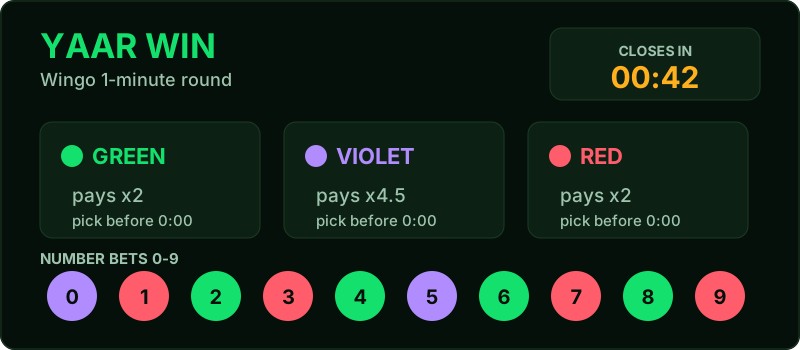
Three pages take the handoff: the register guide if you don't have an account yet (the invite code must go in at signup), the Yaarwin colour prediction guide for the actual maths of Wingo rounds before money goes in, and the real or fake review for how deposits and withdrawals behave in practice — including what a normal withdrawal timeline looks like.
Yaar Win game download FAQ
Is the Yaar Win APK free?
Yes — the download and install cost nothing. Money only enters when you choose to deposit inside the game.
Is the "YAR" app on Uptodown the same thing?
No. That's an unrelated board game that happens to match the spelling. The genuine YaarWin game APK comes only from the platform itself.
Is allowing "unknown sources" dangerous?
The permission is per-source and revocable. The real risk isn't the Android setting — it's the file you install. From the official platform: fine. From a Telegram forward: never.
How big is the download?
Around 15 MB for the APK, roughly 50 MB installed. It's a thin client; the heavy lifting happens server-side.
Do I need to update the app?
The app prompts you when a new build ships and serves the file itself. Updates install over the top — your account and balance are untouched.